Amazon FBA Shipment Tracking: A Complete Seller Guide
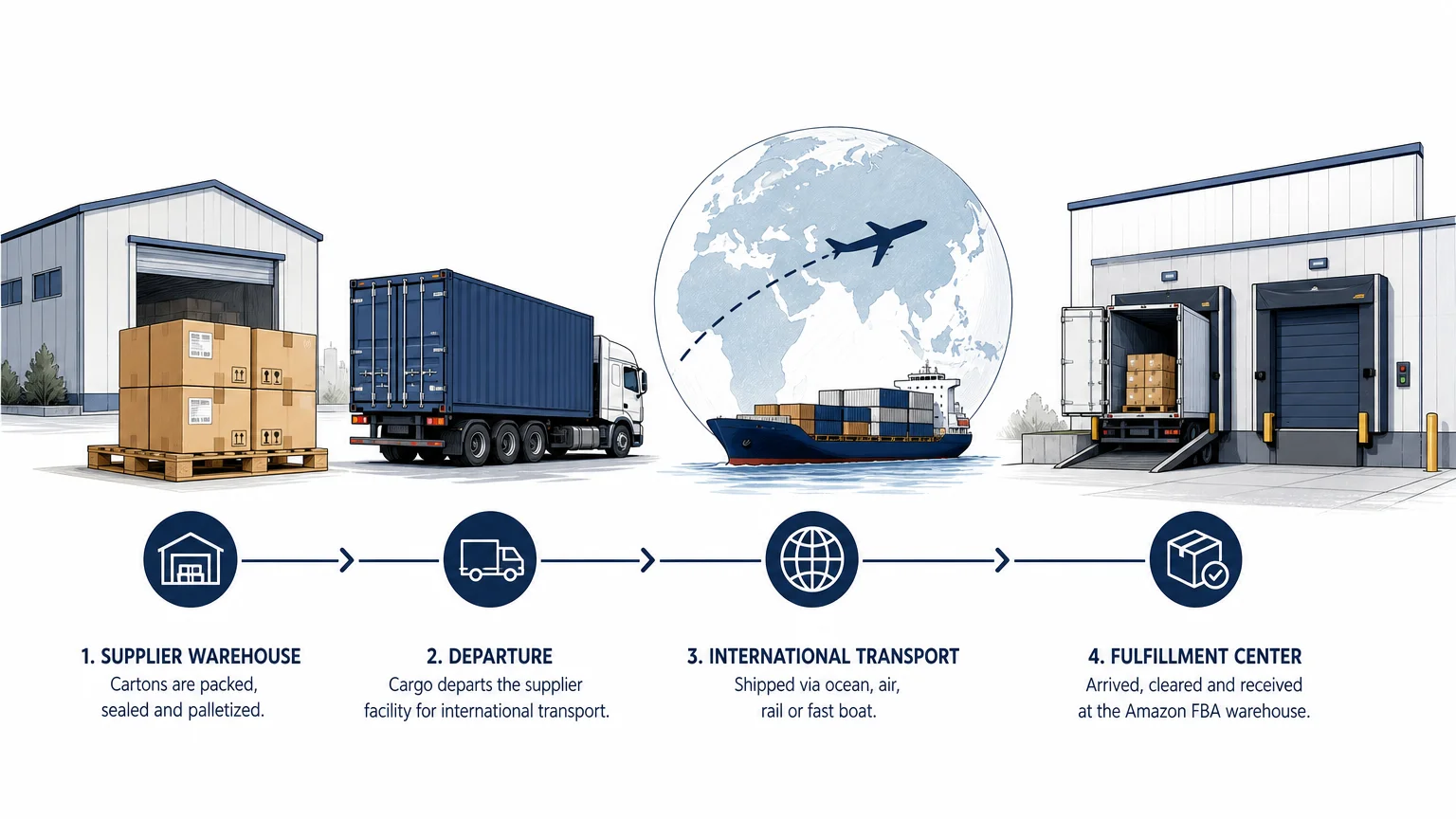
Summary: Amazon FBA shipment tracking combines Seller Central status updates, carrier scans, delivery records, and receiving quantities. A shipment marked Delivered has not necessarily been checked in or made available for sale. By comparing each milestone, monitoring discrepancies, and keeping supplier-to-warehouse records, you can identify delays earlier and protect inventory planning.
A shipment can show as Delivered while your inventory is still unavailable for sale. The most reliable process combines the Shipping Queue, carrier tracking, receiving quantities, and your own shipment documents. For a broader workflow reference, our Amazon Seller Central guide explains how these tools fit into daily FBA management.
The practical meaning of Amazon FBA shipment tracking is broader than checking whether a carrier has delivered cartons. You need to know where the shipment is, what Amazon has scanned, how many units have been received, and whether the shipment is ready for reconciliation. This distinction matters for US sellers managing replenishment, launches, and stockout risk.
What Amazon FBA shipment tracking actually shows
Amazon inbound tracking follows inventory from shipment creation through delivery, check-in, receiving, and closure. These milestones describe Amazon’s view of the shipment, not necessarily every movement from your supplier’s facility to the fulfillment center.
Amazon’s official FBA tracking guide explains that sellers can review shipment events from the Shipping Queue and use carrier information while inventory is in transit. The two views serve different purposes. Carrier tracking helps you monitor transportation, while Seller Central shows how Amazon has processed the inbound shipment.
This distinction prevents a common mistake. A carrier may confirm delivery to a fulfillment center, but Amazon may still need to move the freight from the yard to the dock, unload it, scan shipment labels, and count the units. Until receiving progresses, the inventory may not appear as immediately available for customer orders.
| Status | What it generally means | What you should check |
|---|---|---|
| Shipment created | The shipment exists in Seller Central, but the goods may not have been handed to a carrier. | Confirm the shipment ID, destination, contents, and planned delivery window. |
| Ready to ship | Labels have been prepared, but the shipment may still be awaiting pickup. | Verify that box labels and required documentation are complete. |
| Shipped | The carrier has collected the shipment or you have handed it over. | Confirm that carrier tracking details are connected to the shipment. |
| In transit | Amazon has carrier information indicating that the shipment is moving. | Review the carrier’s latest scan for the physical location. |
| Delivered | The carrier has reported delivery or arrival at the fulfillment center facility. | Do not assume that Amazon has checked in or counted the units. |
| Checked in | The shipment has moved into the fulfillment center receiving process. | Monitor the transition to Receiving and watch unit counts. |
| Receiving | Amazon has started scanning and processing the shipment contents. | Compare received quantities with the units you expected. |
| Closed | Amazon has completed receiving or the shipment has reached its closure condition. | Review discrepancies and determine whether reconciliation is required. |
How to track an FBA shipment in Seller Central
Start with the Shipping Queue rather than a general customer order tracking page. In Seller Central, open the main inventory menu, select Shipments, and locate the relevant inbound shipment. You can then open the shipment summary and select Track shipment for additional details.
The shipment summary normally provides several useful views. The status shows the current stage, shipment events show the recorded progression, and the contents area helps you compare expected units with units located or received. Review these sections together instead of relying on a single status label.
Search by shipment ID when possible. This reduces the chance of opening a similar shipment for the same SKU or destination. It also helps you connect Seller Central records with carrier documents, purchase orders, packing lists, and warehouse communications.
For recurring shipments, create a simple internal log containing the shipment ID, carrier, tracking numbers, supplier handoff date, estimated delivery window, fulfillment center destination, expected cartons, expected units, and actual receiving date. This record gives you a second source of truth when the platform status changes slowly or a shipment contains multiple tracking numbers.
Why carrier tracking and Seller Central can disagree
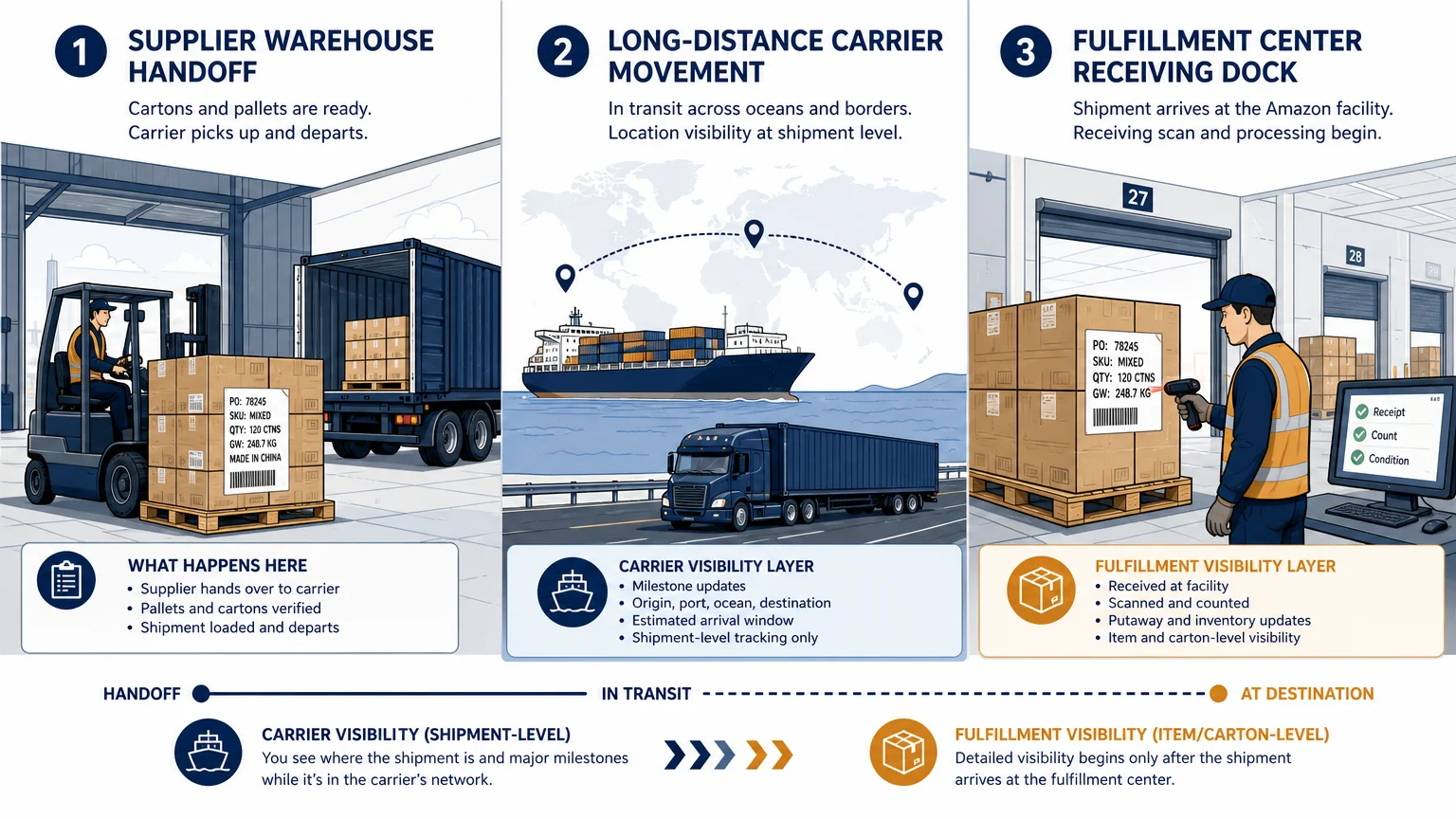
The most confusing tracking gap occurs after the carrier reports delivery and before Amazon records receiving progress. These are separate operational events. Delivery confirms that the shipment reached the destination facility or its receiving area. Check-in and Receiving indicate that Amazon has begun processing it internally.
Amazon’s FBA guidance shows the importance of tracking the shipment through its complete event sequence rather than stopping at Delivered. A FBA guidance PDF also illustrates the Shipping Queue and Track shipment workflow used to monitor inbound inventory.
Scan gaps can occur when a carrier does not transmit an event immediately, when freight is processed in bulk, or when the fulfillment center has not yet completed its next internal step. High-volume periods can lengthen the interval between events. A missing update does not automatically prove that the shipment is lost.
When the carrier says Delivered but Seller Central still shows In transit, compare the delivery date, proof of delivery, destination address, tracking number, and shipment ID. If the information matches, continue monitoring for the next Amazon milestone. If the records conflict, contact the carrier or logistics provider before assuming that Amazon has physical possession of every carton.
What to check when an FBA shipment appears stuck
Before opening a support case, identify the exact point where progress stopped. The correct response depends on whether the issue concerns transportation, delivery communication, check-in, receiving, or a unit discrepancy.
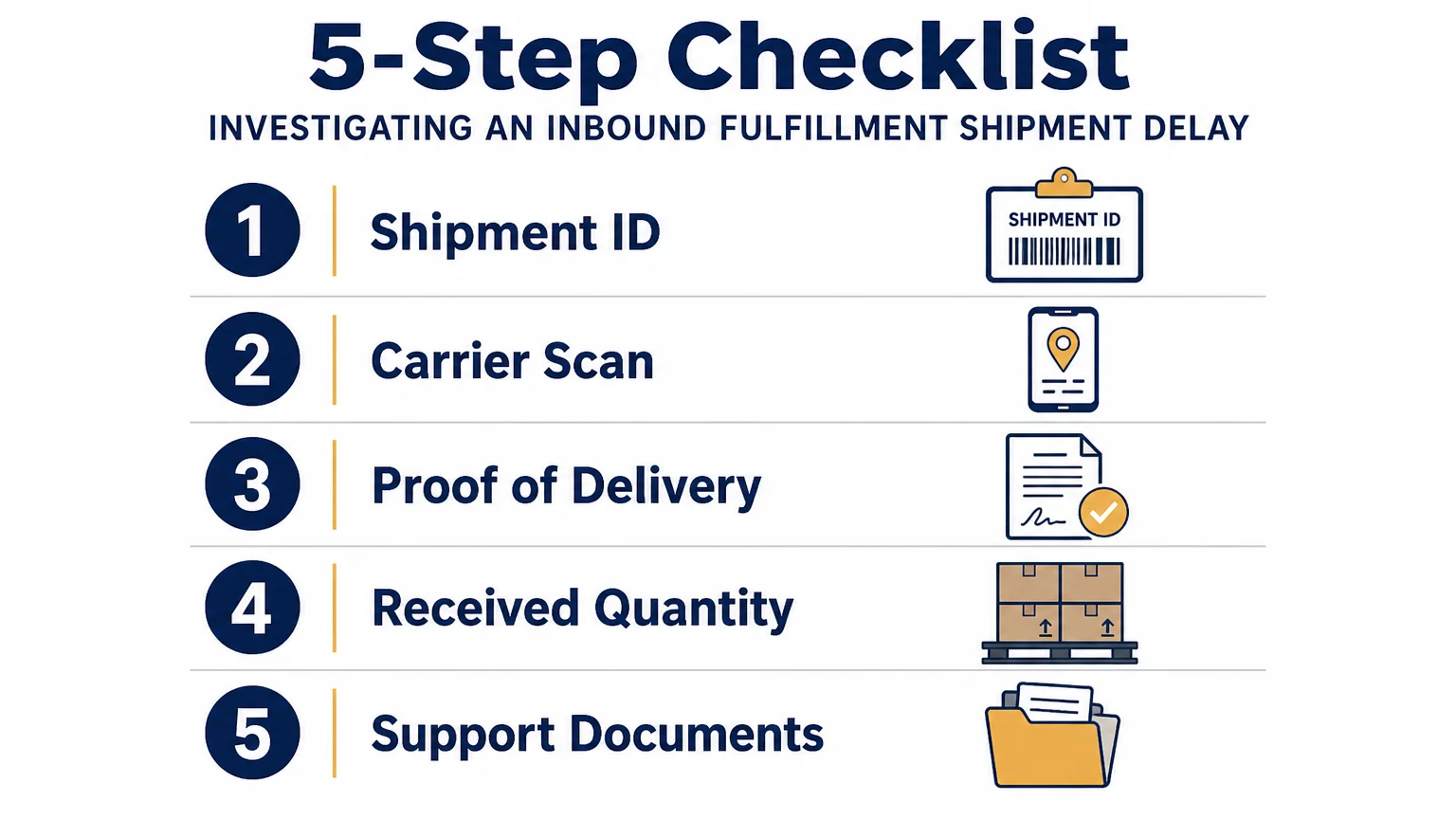
- Confirm the shipment identity. Match the shipment ID, destination fulfillment center, tracking number, SKU list, and expected unit count.
- Review the latest carrier event. Check whether the shipment is moving, awaiting customs processing, held for an appointment, or marked delivered.
- Verify delivery evidence. Keep the proof of delivery, signed receipt, delivery date, carton count, and receiving location.
- Compare Amazon milestones. Check whether the shipment is still Delivered, has moved to Checked in, or has entered Receiving.
- Prepare supporting documents. Gather the packing list, commercial invoice where relevant, tracking records, carton details, and correspondence.
Packaging, labeling, address, quantity, and preparation errors can also slow receiving. Amazon identifies missing labels, incorrect products, incorrect quantities, wrong ship-to information, and late arrival as common inbound inventory problems. These issues are easier to investigate when your shipment documents match the information entered in the shipping plan.
If your shipment is coming from China, delivery appointments can create an additional tracking point. Our guide explains how to track Amazon FBA delivery appointments and reduce the risk of missed handoffs or extra charges.
How to monitor receiving and inventory discrepancies
Receiving is not complete simply because the first units appear in your account. Amazon may receive inventory in stages, and quantities can change as cartons are scanned and processed. Monitor received units against the quantity you declared in the shipment plan.
A discrepancy exists when the units you expected Amazon to receive do not match the units Amazon reports as located or received. Possible causes include a supplier short-shipping the order, incorrect carton contents, labeling errors, damage, scanning problems, or inventory still being processed.
Use the shipment summary and Contents tab to inspect the difference. When the shipment becomes eligible for reconciliation, select the relevant action, provide supporting information, and submit the request through Seller Central. Keep the case number and respond promptly if Amazon requests additional evidence.
For sellers who maintain separate operational records, inbound shipment reports can make this review easier. A specialist reference on inbound report fields describes data such as shipment status, origin, destination, carrier, and received quantity. Use any external reporting system as a supplement, not as a replacement for checking the authoritative shipment record in Seller Central.
Do not wait until a stockout is imminent to investigate a discrepancy. Replenishment planning should account for transportation time, customs processing, fulfillment center receiving, and the time required to resolve a short count. This is especially important when your sales velocity leaves little safety stock.
How a freight forwarder can extend shipment visibility
Seller Central begins to provide meaningful inbound visibility after an FBA shipment has been created and carrier information is available. It does not necessarily show every event between your supplier’s loading area, export handling, international transport, customs clearance, and final delivery appointment.
That supplier-to-Amazon segment is where an end-to-end logistics provider can add practical visibility. We coordinate supplier pickup, international air, fast-boat, ocean, or rail freight, Chinese export declarations, destination customs clearance, DDP duties and taxes, and delivery to the Amazon warehouse. Shipment progress is supported through real-time tracking, WhatsApp updates, and key-stage notifications.
Route selection also affects what you should expect from tracking. Air freight is positioned for urgent or lightweight shipments, fast boat for regular cartons that need a balance between speed and cost, rail for certain China to Europe flows, and ocean freight for larger planned volumes. Delivery periods remain estimates, so your inventory plan should include operating margin rather than relying on a single promised date.
When requesting a quote, provide the product details, quantities, weights, dimensions, origin, destination, and preferred urgency. We provide three route options with pricing and estimated timelines within 24 hours, allowing you to compare cost and delivery priorities before selecting a method. Our team has more than five years of stated experience shipping from China and operates from Shenzhen near factories and ports.
If the main challenge is selecting a transport method rather than interpreting an Amazon status, our guide can help you choose a carrier for Amazon FBA shipments according to shipment characteristics and timing needs.
What information should you keep for every inbound shipment?
A complete shipment file makes tracking faster and reconciliation more defensible. Keep the Seller Central shipment ID, shipping plan, carton labels, carrier tracking numbers, packing list, commercial documents, pickup confirmation, proof of delivery, appointment details, and communication history.
Your packing list should clearly identify the products, quantities, weights, and dimensions. If a freight forwarder manages the shipment, request milestone updates that distinguish supplier pickup, export departure, international arrival, customs clearance, final-mile handoff, delivery, and Amazon receiving.
For international replenishment into the US, also confirm who is responsible for customs clearance, duties, taxes, import handling, and delivery appointments. A DDP structure can place these processes within the quoted service, but you should still review the quote conditions and any exception fees before shipping.
QG Horizon’s intake process accepts packing-list files in PNG, JPG, WEBP, PDF, or XLSX format, with a maximum file size of 10 MB. The information supports route evaluation and shipment preparation, while tracking begins once the transport process is underway.
Make every FBA tracking milestone useful
Effective Amazon FBA shipment tracking means interpreting the entire chain, not checking one status label. Compare carrier events with Seller Central milestones, monitor receiving quantities, preserve shipment documents, and investigate discrepancies before they affect availability. When visibility is limited before Amazon receives the goods, include supplier and logistics milestones in the same operating record.
Improve Visibility Across Your FBA Shipment
When your inventory moves from a Chinese supplier to an Amazon warehouse, Seller Central is only one part of the tracking process. You also need reliable coordination for pickup, freight, customs, delivery appointments, and final warehouse handoff.
We manage China-to-Amazon FBA logistics with route options across air, fast boat, ocean, and rail. Our service includes DDP handling, door-to-door delivery, milestone updates, real-time tracking, and WhatsApp support. Request a quote for Amazon FBA shipping services based on your shipment details.
Frequently Asked Questions
Where can you track an Amazon FBA shipment?
Open Seller Central, go to Inventory, select Shipments, and open the relevant shipment from the Shipping Queue. Use Track shipment and the shipment summary to review status, events, carrier information, and receiving details.
Does Delivered mean that Amazon has received the inventory?
Delivered generally means that the carrier has reported delivery or arrival at the fulfillment center facility. Amazon may still need to check in, unload, scan, and receive the units before they become available for sale.
Why is an FBA shipment stuck in In transit?
The carrier may not have transmitted a new scan, or Amazon may not yet have processed the delivery information. Compare the carrier record with the shipment ID and delivery evidence before contacting support or your logistics provider.
What should you do if Amazon receives fewer units than expected?
Review the Contents tab in the shipment summary and compare the discrepancy with your packing list, supplier records, and proof of delivery. When the shipment becomes eligible, submit a reconciliation request with documents that support the quantity you shipped.
Can a freight forwarder provide tracking before Amazon receives the shipment?
Yes, a freight forwarder can provide milestones for supplier pickup, international transport, customs clearance, and final delivery before Amazon records receiving activity. Our service adds real-time tracking, WhatsApp updates, and key-stage notifications to the Seller Central record.
Ready to Optimize Your Amazon Shipping?
Get 3 route options tailored to your products and timeline
Get Your Quote→